Open Source • eBPF-powered • Zero Code Changes

Per-Request Performance
Monitoring for K8s Applications

Measure CPU time, memory, network I/O, and duration for every HTTP request hitting your pods. Track correlation IDs across services. Zero instrumentation required.

View on GitHub Quick Start ↓
500+
Requests/sec throughput
<1%
CPU overhead
0
Code changes needed
7
Metrics per request

Everything You Need

Deep per-request visibility without touching your application code

🔬

Per-Request Granularity

CPU time, memory RSS, duration, and network bytes measured for each individual HTTP request — not just aggregates.

Real CPU Time

Uses kernel sched_switch tracepoint for actual on-CPU nanoseconds. No estimation, no approximation.

🔗

Correlation ID Tracking

Auto-extracts X-Correlation-ID, X-Request-ID, traceparent, and 4 more headers. Fully configurable.

🚫

Zero Instrumentation

eBPF attaches to kernel TCP functions. No SDK, no sidecar, no agent library. Works with any language.

📊

Prometheus Histograms

Bounded-cardinality aggregate metrics for alerting and long-term trending. Plus per-request gauges for detail view.

📈

Grafana Dashboard

Pre-built 8-panel dashboard with request table, time-series charts, and filtering by namespace/pod/correlation ID.

🏗️

Helm Chart

Single-command deployment. Bundled Prometheus + Grafana, or integrate with your existing monitoring stack.

💾

Flexible Storage

In-memory ring buffer for speed, optional SQLite for persistence, optional Remote Write to VictoriaMetrics.

🌐

Dependency Tracking

Captures outbound TCP connections made during request processing. Maps destination IPs to K8s service names.

Dashboard Preview

Real-time Grafana dashboard with per-request visibility
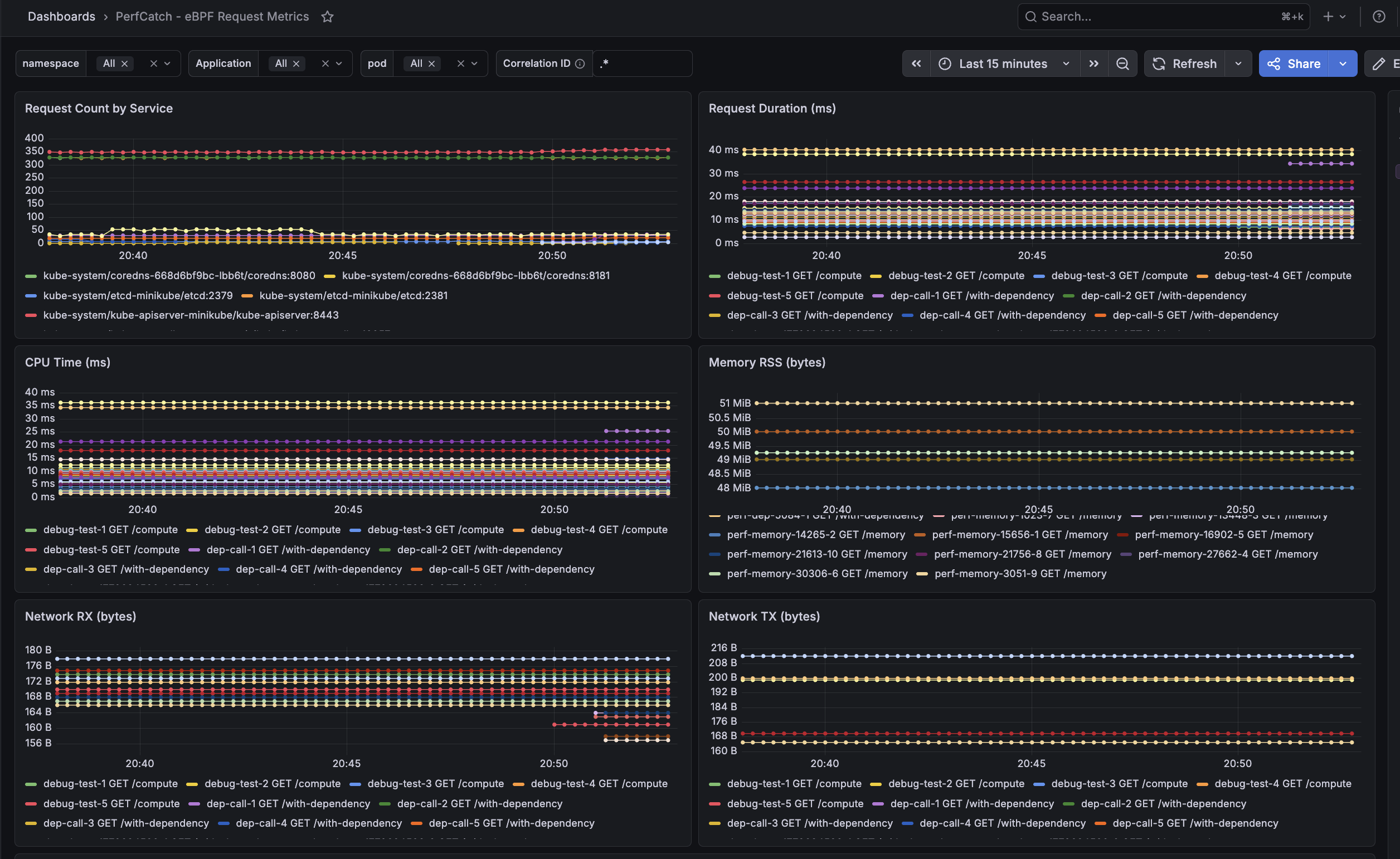
PerfCatch Grafana Dashboard - Request Count, Duration, CPU Time, Memory RSS, Network RX/TX panels

Grafana Dashboard — Time-Series Panels

6 panels showing Request Count by Service, Request Duration (ms), CPU Time (ms), Memory RSS (bytes), Network RX and TX bytes — all with per-pod granularity and correlation ID filtering.
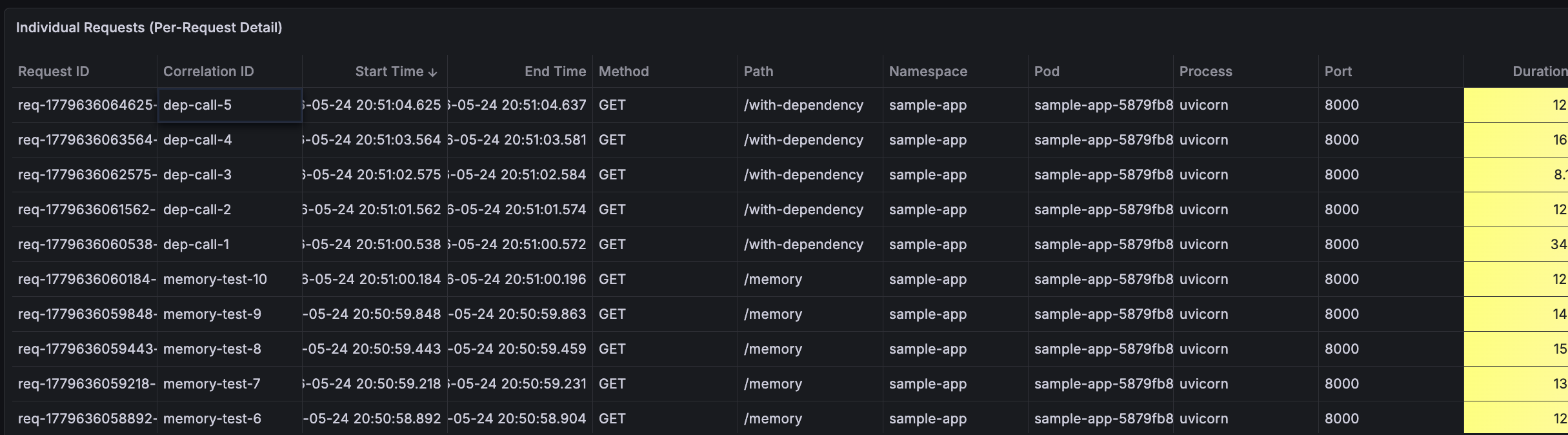
Individual Requests table showing Request ID, Correlation ID, timestamps, method, path, namespace, pod

Per-Request Detail Table

Every individual request with Request ID, Correlation ID, Start/End Time, HTTP Method, Path, Namespace, Pod, and Process info.
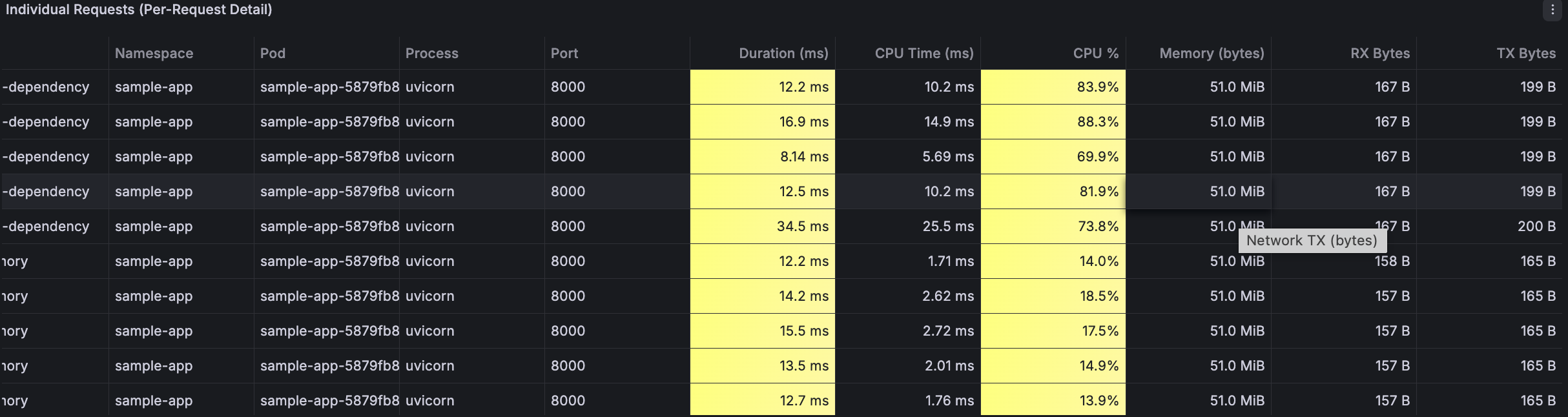
Individual Requests table showing Duration, CPU Time, CPU %, Memory, RX/TX Bytes

Resource Metrics per Request

Duration (ms), CPU Time (ms), CPU % utilization, Memory (bytes), Network RX and TX bytes — color-coded for quick anomaly detection.

How It Works

eBPF programs in kernel space, zero-copy event processing in userspace

Your App Pods

⚡ HTTP request

perfcatch-agent DaemonSet

request_tracker.c
dependency_tracker.c
resource_tracker.c
Collector
Correlator
Ring Buffer (50K)
/metrics
/api/requests
Prometheus

Scrape /metrics every 15s
5Gi PVC • 15d retention

Remote Write

VictoriaMetrics / Mimir / Thanos
Long-term per-request storage

Grafana

Pre-built 8-panel dashboard
Real-time request table

What It Measures

Deep visibility into every request's resource consumption

Metric Source Description
duration_ms accept() → tcp_close() Total request wall-clock time
cpu_time_ms sched_switch tracepoint Actual on-CPU execution time (not wall-clock)
memory_rss_bytes /proc/<pid>/status Process RSS memory at request time
bytes_received tcp_recvmsg kprobe Network bytes received per request
bytes_sent tcp_sendmsg kprobe Network bytes sent per request
correlation_id HTTP header capture (eBPF) Extracted from X-Correlation-ID, traceparent, etc.
http_method / path TCP stream first bytes GET /compute extracted from request line

Deployment Options

Choose the setup that fits your infrastructure

🟢 Full Stack (Default)

Agent + Prometheus (5Gi PVC, 15d retention) + Grafana with pre-built dashboard

helm install perfcatch charts/perfcatch \
  -n perfcatch --create-namespace

🔵 With VictoriaMetrics

Full stack + long-term per-request storage via Remote Write (30d retention)

helm install perfcatch charts/perfcatch \
  -n perfcatch --create-namespace \
  --set monitoring.victoriametrics.enabled=true

🟡 Existing Prometheus

Agent only — auto-discovered via pod annotations. No bundled monitoring.

helm install perfcatch charts/perfcatch \
  -n perfcatch --create-namespace \
  --set monitoring.enabled=false

⚪ Standalone (API Only)

No Prometheus. SQLite persistence on hostPath. Query via /api/requests.

helm install perfcatch charts/perfcatch \
  -n perfcatch --create-namespace \
  --set monitoring.enabled=false \
  --set prometheusAnnotations.enabled=false

Storage Architecture

Layered design optimized for high throughput with flexible durability

Ring Buffer

In-memory deque
50K entries
Zero I/O

Ephemeral

Prometheus

Histograms + gauges
5Gi PVC
15d retention

Persistent

Remote Write

VictoriaMetrics
10Gi PVC
30d retention

Persistent

SQLite

hostPath volume
Per-node disk
Unlimited

Persistent

Quick Start

Up and running in under 2 minutes

1

Deploy with Helm

Install PerfCatch with the bundled monitoring stack

helm install perfcatch charts/perfcatch \
-n perfcatch --create-namespace \
--set config.namespace=my-app
2

Verify Agent is Running

Check the DaemonSet pod is healthy on your node

kubectl -n perfcatch get pods
NAME READY STATUS RESTARTS AGE
perfcatch-znplr 1/1 Running 0 30s
3

Send Requests with Correlation IDs

Add any supported header — it's auto-captured by eBPF

curl -H "X-Correlation-ID: order-12345" \
http://my-app/compute
4

View in Grafana

Pre-built dashboard with 8 panels — request table, time-series, and filters

kubectl -n monitoring port-forward svc/grafana 3000:3000
→ Open http://localhost:3000
→ Login: admin / perfcatch
→ Dashboard: "PerfCatch - eBPF Request Metrics"
5

Query the API

Get per-request data as JSON — filter by correlation ID, namespace, or pod

curl localhost:9090/api/requests?correlation_id=order-12345
{"count": 1, "requests": [{"duration_ms": 9.24,
"cpu_time_ms": 8.90, "memory_rss_bytes": 53518336, ...}]}

Supported Correlation Headers

Auto-detected from HTTP requests. Add your own with a single config.

x-correlation-id
x-request-id
x-trace-id
traceparent
x-amzn-trace-id
request-id
correlation-id
+ your custom